

Balance Snapshot
Balance Snapshot Guide
View real-time balances for your fiat and crypto accounts in the merchant backend. Each account shows Available, Freeze, and To be settled amounts.
Overview
The balance snapshot helps you:
- Monitor funds across regional fiat accounts (IDR, THB, INR, and more)
- View your USDT crypto account balance
- Confirm how much is available for payouts, withdrawals, and top-ups
Balance Fields
For each account, the backend shows three amounts:
| Field | Meaning |
|---|---|
| Available | Funds you can use now (payouts, withdrawals, transfers) |
| Freeze | Funds temporarily held or locked |
| To be settled | Funds pending settlement before they become available |
Account status
Each account card also shows a status (e.g. Active). Inactive accounts may have restricted operations.
Timezone Display
Amounts and timestamps follow the Currency Time Zone selected in the left sidebar (for example Indonesia-IDR · Asia/Jakarta). Switch the timezone context there if you operate across multiple regions — it is not fixed to a single offset for all merchants.
Prerequisites
- An active merchant account with access to Finance Center
- Production or Sandbox mode as appropriate (balances differ by environment)
View Balances
Option 1: Account Balance page (recommended)
- Sign in to the merchant backend.
- Go to Finance Center → Account Balance.
- Open the Fiat Accounts or Crypto Accounts tab.
- Click an account card on the left to load its details on the right.
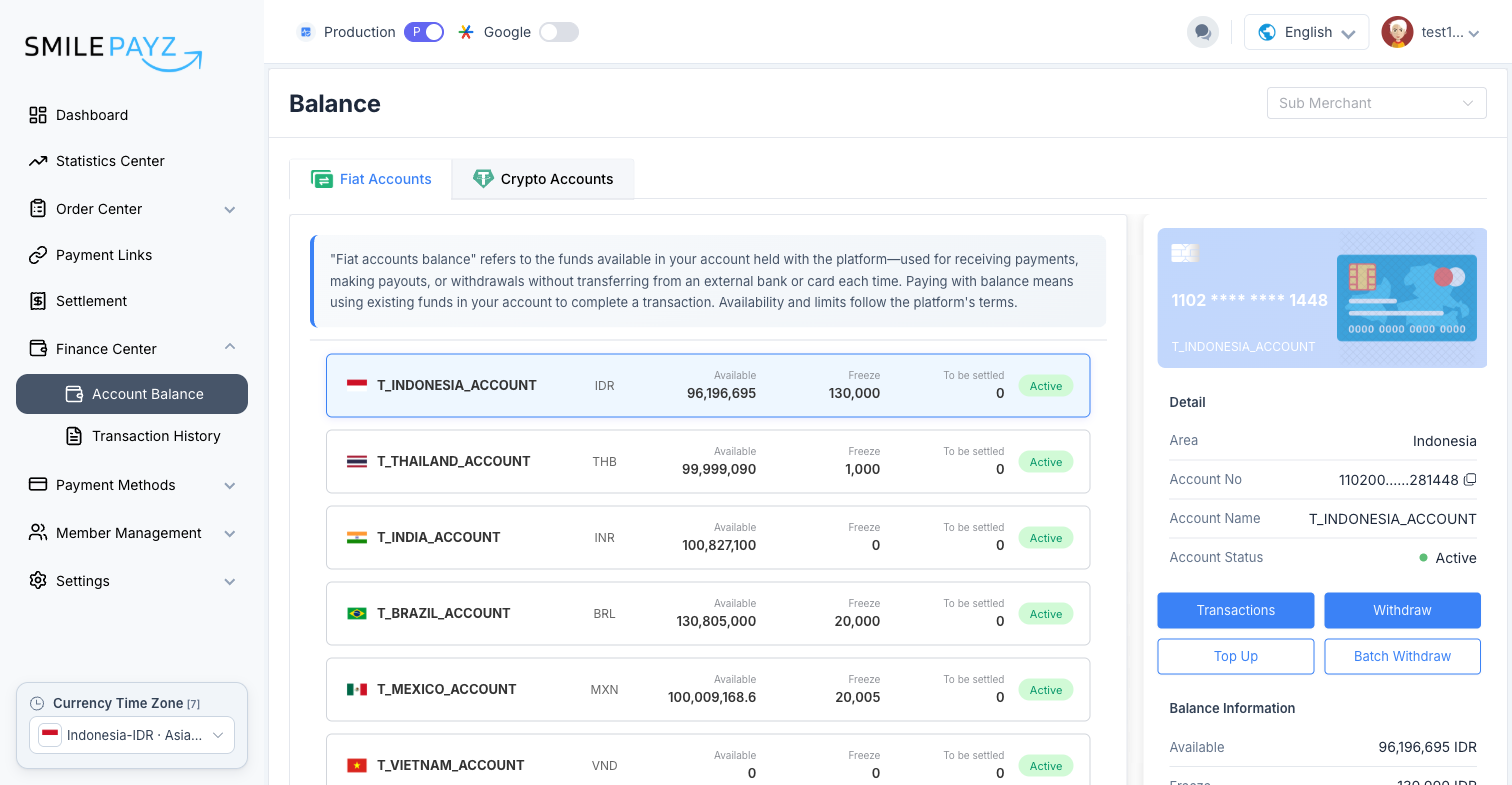
Fiat Accounts — one card per regional account (e.g. T_INDONESIA_ACCOUNT / IDR). The right panel shows:
- Detail — Area, Account No, Account Name, Account Status
- Balance Information — Available, Freeze, To be settled
- Actions — Transactions, Withdraw, Top Up, Batch Withdraw
Crypto Accounts — USDT account (USDT_ACCOUNT) with the same balance fields and account details (no regional Area field).
Sub Merchant filter
If your account has sub-merchants, use the Sub Merchant dropdown at the top of the page to filter balances.
Option 2: Dashboard quick view
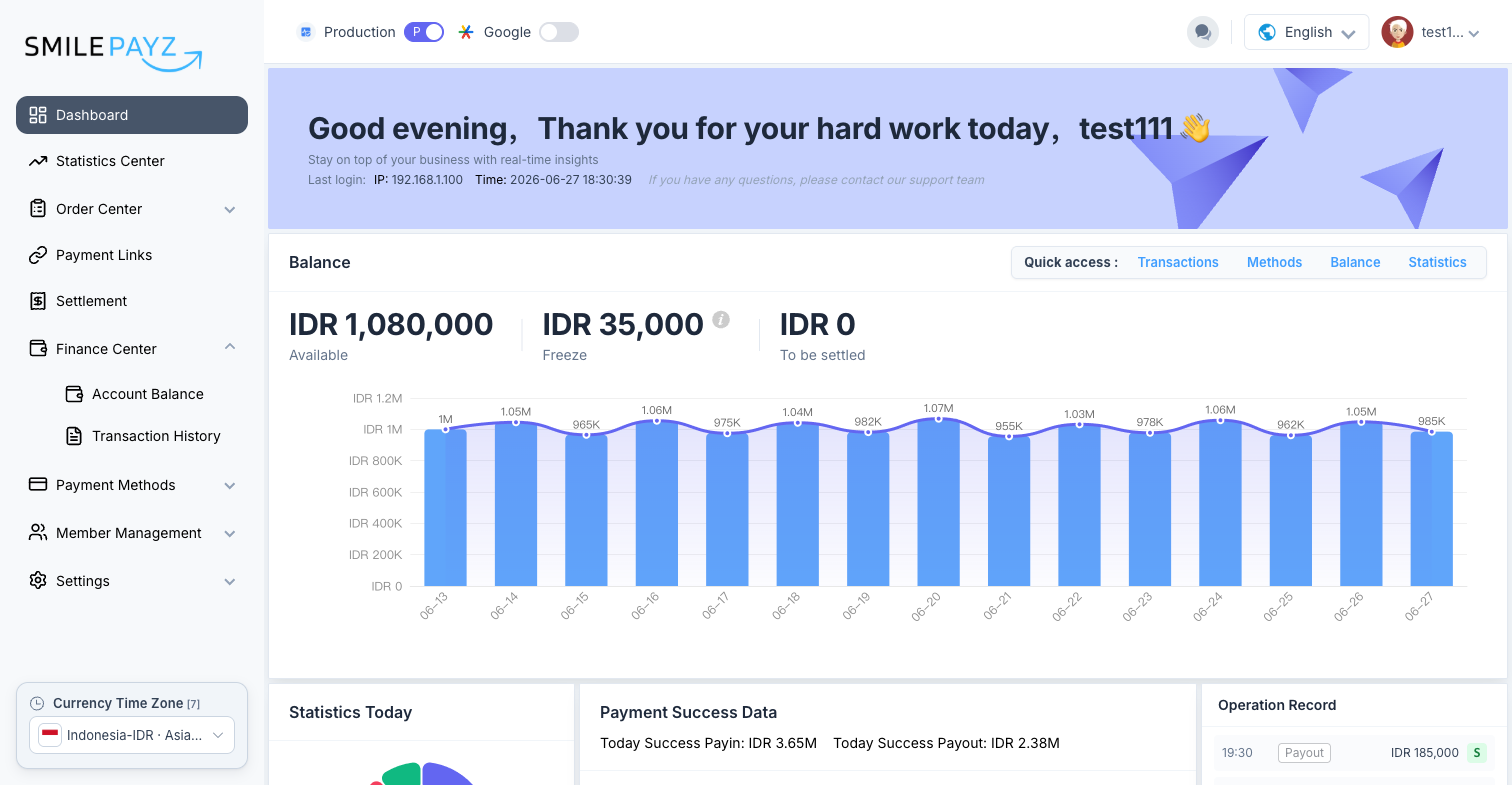
On the Dashboard, the Balance section shows a summary for your current currency context:
- Available
- Freeze
- To be settled
Use the Balance quick-access button to jump to Account Balance.
Programmatic Balance Inquiry
To query balances from your system, use the Balance Inquiry API. You need the account number shown on the Account Balance page (partially masked; use the copy icon to reveal).
Pay-in vs pay-out accounts
The same currency may have separate pay-in and pay-out accounts for API balance inquiry. See the API reference and FAQ for how to obtain production account numbers.
Related Guides
- Account Top-Up
- Account Withdrawal
- Transaction History — Finance Center → Transaction History, or the Transactions button on an account
- Telegram Assistant Bot — balance commands such as
/balidr,/balthb - Balance Inquiry API
Troubleshooting
| Issue | What to do |
|---|---|
| Balance looks outdated | Refresh the page; confirm you are in the correct Production/Sandbox mode |
| Wrong currency shown | Change Currency Time Zone in the sidebar or select the correct account card |
| Cannot find account number | Open Account Balance, select the account, use the copy control next to Account No |
| Available balance too low for payout | Check Freeze and To be settled; pending settlement may reduce available funds |
Support
- Documentation: Balance Inquiry API
- Technical Support: Balance display or API inquiry issues
- Customer Service: Account access and settlement questions